

Quick Recommendation
- If you want the best case for iPad Pro 11 M4, start with your workflow instead of only comparing case thickness.
- Choose a keyboard case if your iPad Pro 11 M4 is used for writing, documents, email, study, or mobile office work.
- Choose a trackpad keyboard case if you move between apps often and want less screen tapping while editing, browsing, or reviewing files.
- Choose a detachable setup if you switch between tablet reading, sketching, and typing during the same day.
- Choose a protection-first case if you carry the iPad through travel, school, field work, or shared workspaces.
- For Chesona, Cloud Digital is the primary productivity route for iPad Pro 11 M4 users. Confirm your exact iPad model before purchase.

The iPad Pro 11 M4 is thin, powerful, and model-specific. A good case should protect the device without getting in the way of the front camera, speaker openings, charging port, keyboard workflow, or Apple Pencil storage path. The right choice depends on how you use the iPad each day.
This refresh keeps the original buying-guide intent: help readers choose the right iPad Pro 11 M4 case. It adds a clearer workflow path, safer compatibility language, real-world image support, and Chesona product routes without turning the article into a generic product page.
Who Is This Guide For?
This guide is for iPad Pro 11 M4 owners who are deciding between a slim protective case, a keyboard case, and a more protective work setup. It is especially useful for writers, students, knowledge workers, business travelers, and iPad-first users who want the M4 iPad Pro to stay portable while becoming easier to type on.
The original question is not only "which case fits?" It is "which case fits the way I actually use this iPad?" A user who writes reports in a coffee shop needs a different setup from someone who sketches in tablet mode all day or carries the iPad between job sites.
Workflow Recommendation Matrix
| Workflow | Main priority | Recommended Chesona path | Why it fits | CTA |
|---|---|---|---|---|
| Writing, email, documents, study | Typing and trackpad control | Cloud Digital for iPad Pro 11 M4 | Built around daily productivity, writing, touchpad, light office, mobile office, and study workflows. | Explore Chesona Cloud |
| Travel, school, field work, shared spaces | More protective daily carry | Rugged for iPad Pro 11 M4 | Better fit when protection and stability matter more than a slim desk setup. | Explore Chesona Rugged |
| Photo/video or desk expansion planning | Creator workflow path | Armor Dock Pro related workflow | Consider this route only when dock, storage, SD import, or external display workflow is the main decision. | See Armor Dock Pro |
| Tablet reading plus occasional typing | Flexibility | Detachable keyboard-case route | Detachable layouts help you move between tablet mode and typing mode. | Compare iPad Pro keyboard cases |
Mobile publishing note: this matrix should become stacked cards on phone widths because it has more than three columns.
What To Check Before Buying An iPad Pro 11 M4 Case
The iPad Pro 11 M4 has a model-specific body, so older cases can create problems even when the screen size sounds similar. Before buying, check the exact iPad model number, camera area, button placement, speaker openings, charging port access, and Apple Pencil storage or charging path.
For a keyboard case, the most important questions are practical:
- Can you type comfortably for the length of work you do?
- Is the trackpad useful for your apps and gestures?
- Does the case hold the iPad steady at your normal viewing angle?
- Can you detach or fold the keyboard when you want tablet mode?
- Does the case protect the edges without blocking ports or controls?
- Is the product listing clear about iPad Pro 11-inch M4 support?

Avoid choosing only by price or by a single feature. A slim cover may be enough for reading and sketching, but it will not solve typing fatigue. A more protective case may be better for travel or field work, but it may add more bulk than a desk-focused writer wants.
Recommended Chesona Product Paths
Chesona Cloud Digital For iPad Pro 11 M4
Use Cloud Digital as the primary route when your iPad Pro 11 M4 is part of a daily productivity setup. This is the better fit for writing, document review, email, meetings, study, and mobile office use.
Chesona product knowledge lists a Cloud Digital product URL for iPad Pro 11-inch M4 2024 model numbers A2837, A3006, and A2836. Because compatibility claims require review, the published module should remind readers to confirm their model number on the product page before purchase.
Explore Chesona Cloud for iPad Pro 11 M4

Chesona Rugged For Protection-First iPad Pro 11 M4 Use
Choose Rugged when the case needs to handle travel, school bags, field visits, or shared spaces where protection is the first buying reason. Keep the language practical: protection-first, stable, and useful on the move. Do not claim unverified protection certifications or specific drop ratings unless those claims are separately verified.
Explore Chesona Rugged for iPad Pro 11 M4
Armor Dock Pro As A Related Creator Workflow Path
If your search for an iPad Pro 11 M4 case is really about building a creator workstation, compare Armor Dock Pro separately. It is a better content path for users thinking about iPad Pro creator workflows, storage planning, SD card import, and external display setup. This article should mention it as a related path, not as the main case pick.
Product Comparison Table
| Chesona path | Best-fit user | Main workflow | Decision factor | Compatibility reminder | CTA |
|---|---|---|---|---|---|
| Cloud Digital | Writers, students, knowledge workers, mobile professionals | Typing, documents, meetings, study, trackpad navigation | Productivity without moving away from iPad | Confirm iPad Pro 11 M4 model number before purchase | Explore Chesona Cloud |
| Rugged | Travelers, school users, field workers | Carrying, typing, shared-space use, protection-first work | More protective daily setup | Confirm the exact iPad Pro 11 M4 product listing | Explore Chesona Rugged |
| Armor Dock Pro | Photographers, video creators, iPad Pro power users | Dock, storage, SD import, external display planning | Creator workflow expansion | Review product details for model and workflow fit | See Armor Dock Pro |
Mobile publishing note: convert this table into product cards on phone screens.
Real-World Workflow Images
This refreshed buying guide uses four editorial workflow images rather than product-only or PDP gallery images. Each image has a different purpose in the buying decision.
- Environment: coffee shop mobile writing setup.
- Workflow: office meeting and document review setup.
- Product: travel setup showing keyboard, trackpad, and viewing angle in use.
- Decision: comparison table scene for choosing between productivity and protection paths.

KOL Video Proof
For a real-world look at a Chesona Cloud keyboard-case workflow, use this Video Proof Card:
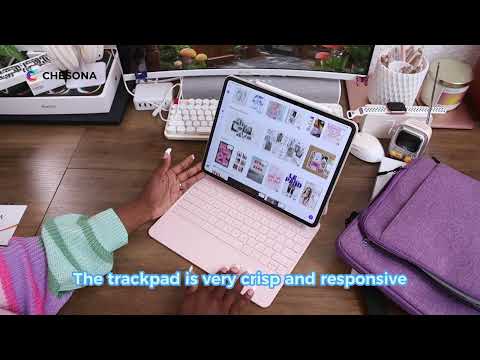
Use this only as workflow context. Do not quote creator claims, compatibility claims, rankings, or performance claims unless reviewed.
Related Buying Guides
Planned collection links for iPad Pro M4 case and iPad Pro M4 keyboard case should remain on hold until live and approved.
FAQ
What is the best case for iPad Pro 11 M4 with keyboard?
For productivity, choose a keyboard case that fits the iPad Pro 11 M4 body, keeps ports and controls accessible, and gives you comfortable typing plus trackpad navigation. Chesona Cloud Digital is the primary Chesona route for daily writing, study, document review, and mobile office workflows. Confirm your iPad model number before purchase.
Are iPad Pro 11 M4 cases compatible with older iPad Pro 11 models?
Do not assume compatibility across generations. The iPad Pro 11 M4 has model-specific layout considerations, so an older case may not align with the camera, buttons, speaker openings, or charging area. Check the product page against your exact iPad model number.
Should I choose Cloud or Rugged for iPad Pro 11 M4?
Choose Cloud if your main need is typing, trackpad control, writing, email, documents, study, or mobile office work. Choose Rugged if the iPad is carried through travel, school, field work, or shared spaces where protection is the stronger priority.
Do iPad Pro 11 M4 keyboard cases support Apple Pencil Pro?
Some cases include pencil storage or leave room for the pencil area, but support depends on the exact case design and iPad/stylus combination. Verify the product listing before publishing or purchasing. Do not publish a charging-through-case claim unless it has been checked against the product page.
How do I connect a Chesona keyboard case by Bluetooth?
For Bluetooth keyboard products, the FAQ source says first startup may pair automatically. For manual pairing, long press FN+Q or FN+W; to switch connected devices, short press FN+Q or FN+W. Shortcuts may vary by model, so final publishing should verify the manual for the specific iPad Pro 11 M4 product.
CTA
Your best iPad Pro 11 M4 case depends on the work you want the iPad to support. Start with Cloud if your priority is a keyboard-and-trackpad productivity setup. Compare Rugged if you need a more protective daily carry path.
Primary CTA: Explore Chesona Cloud for iPad Pro 11 M4
Secondary CTA: Compare iPad Pro Keyboard Cases
Compatibility reminder: confirm your iPad model before purchase.
