We have all been there. You are trying to watch a movie or type an email, and your tablet keeps sliding flat onto the table. You try propping it up against a coffee mug, but it inevitably crashes down.
Most users don't realize that the thin flap covering their screen is a precision-engineered tool. Whether you have an iPad or an Android device, learning how to use a tablet cover as a stand effectively can transform your workflow.
In this guide, we will master the folds, angles, and modes that keep your device rock-steady.
■ What To Know 💡
- The Movie Mode (60°): Fold the cover into a triangle behind the screen. Rest the tablet against the triangle for an upright view.
- The Typing Mode (30°): Lay the tablet flat. Fold the cover into a triangle under the top edge to create a slight incline.
- The Levitate Mode: Upgrade to a magnetic keyboard case that "floats" your tablet for a laptop-like experience.
- Expert Tip: Magnetic covers only fold one way. If it flops over, flip the fold so the magnetic or microfiber side is facing out.
Know Your Tablet Cover Type Before You Fold It
Not all covers fold the same way. The first step is to figure out which style you have. This will tell you how to turn it into a stand without fighting the design.
Common Types of Tablet Covers That Become Stands
Here is what to look for:
- Tri-fold smart cover: Front cover has three rectangular sections. Often used on iPads and Samsung tablets.
- Simple folio case: Front cover is one big flap that opens like a book. Inside you may see grooves or lines for different angles.
- Keyboard case with stand: Has a built in keyboard and either a magnetic back cover or kickstand. Can be used as a stand in multiple angles.
- Origami-style case: Cover has extra folds and magnets that let you create different 3D shapes as a stand.
- Multi-angle stand case: Typically features a strong back hinge or a hard kickstand that supports multiple viewing angles.
How to Use a Keyboard Case as a Tablet Stand

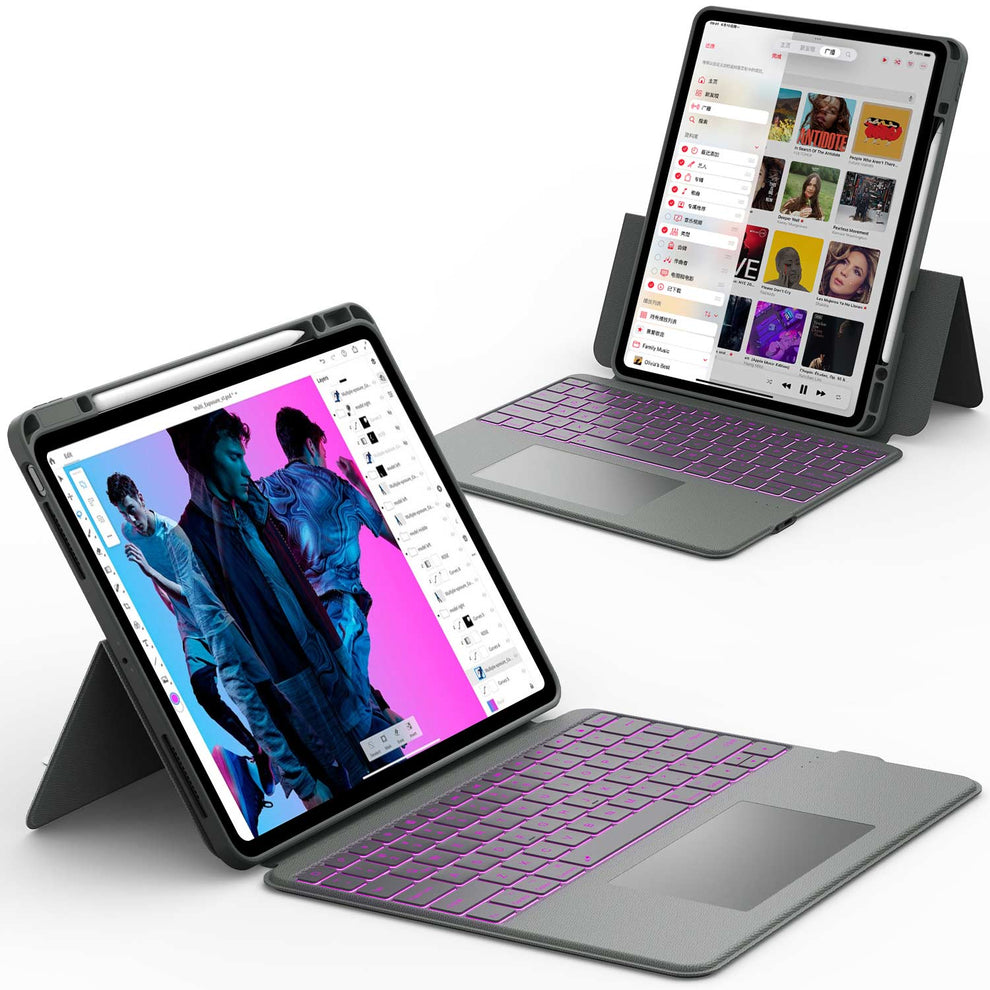
Keyboard cases are great because they give you both a stand and a keyboard. Many of Chesona’s keyboard cases can be used in three main modes: laptop mode, tablet stand mode, and pure tablet mode.
Use Laptop Mode for Typing
This is the classic mode:
- Attach your tablet to the keyboard case (usually magnetically or through a secure frame).
- Open the cover like a laptop.
- The tablet’s back or a separate kickstand leans at a fixed angle while the keyboard lies flat.
- Type as you would on a laptop.
This is the best angle for:
- Writing emails
- Taking notes in class
- Working in Google Docs or Microsoft Word
Convert Keyboard Case Into a Viewing Stand
If you are not typing, you may only need the stand, not the keyboard.
On many convertible Chesona keyboard cases:
- Detach the keyboard (if it is magnetic) or fold it backward so it lies under the tablet.
- Use the back cover hinge or stand flap to support the tablet upright.
- Adjust to a wider or narrower angle depending on whether you are streaming, presenting, or browsing.
This is perfect for watching movies when your tablet is on a desk or kitchen counter.
Recommended Keyboard Cases That Convert Into Stands
Some keyboard cases are designed specifically to work as strong stands.
Two examples from Chesona:
-
Chesona 7 Color Backlit Keyboard Case With Trackpad
- Works as a full laptop-style setup when the keyboard is attached.
- You can detach the keyboard and still use the cover as a sturdy stand.
- The stain-resistant cover protects your tablet when folded up.
- The S Pen holder keeps your stylus secure while you move around.
-
Chesona Levitate Series Keyboard Case for Samsung Galaxy Tab
- Uses a floating style stand that holds the tablet magnetically above the keyboard.
- You can adjust the angle easily for work or streaming.
- The cover becomes a solid stand whether the keyboard is active or not.
Both options provide a stable stand and a backlit keyboard and trackpad for full productivity.
Choose the Right Angle for the Right Activity

Using a tablet cover as a stand isn't just about making it stand up; it's about choosing the right angle for your posture.
| Mode | Angle | Best For | How to Fold |
|---|---|---|---|
| Viewing Stand | 60° - 70° | Movies, Zoom Calls, Reading | Tri-fold triangle behind the device. |
| Typing Wedge | 15° - 30° | Typing Emails, Sketching | Lay flat, fold triangle under top edge. |
| Portrait Stand | 90° Vertical | Reading eBooks, Coding | Requires Origami or 360° Rotating Case. |
Avoid Common Mistakes When Using a Tablet Cover as a Stand
Even a good stand can fail if used the wrong way.
Do Not Use It on Very Soft Surfaces
Soft bedding and pillows move. This makes your stand unstable.
Try to:
- Place a tray, book, or laptop desk on the bed and put the stand on that
- Use a table, counter, or hard lap desk whenever possible
Watch for Slipping on Smooth Desks
Some covers have smooth material that slides on glass or polished wood.
To fix this:
- Put a mouse pad, cloth, or desk mat under the stand
- Use a case with a textured or rubberized bottom to grip the surface
Do Not Force Folds Against the Design
If you feel like you are wrestling the cover, you might be folding it the wrong way.
- Follow the existing seams and fold lines
- Let magnets guide the shape
- Never bend hard plastic parts in a way that feels wrong
A well-designed case will almost “snap” into its supported stand positions once you understand the pattern.
Make Your Tablet Cover Work Harder With The Right Case
If your current cover only supports one angle or feels flimsy, it may be time to upgrade.
Consider:
- iPad-specific cases that support both slim tablet only mode and keyboard stand mode
- Cases with USB ports that let you use your cover as a hub and stand at the same time
- All-in-one keyboard cases that convert from a full laptop-style rig to a pure viewing stand
An iPad case and Bluetooth keyboard combo often gives you the most flexibility: you get a stand, keyboard, and protection in one product.
Conclusion
Your tablet cover is more than just screen protection—it is the key to unlocking your device's versatility. Whether you are using the classic 60-degree fold for a Netflix binge or the 30-degree wedge for drafting an email, mastering these folds makes your tablet infinitely more useful.
Final Thought: If you find yourself constantly propping your tablet up with pillows because your current case keeps slipping, stop fighting gravity. It is a small annoyance that ruins your workflow.
FAQs About Tablet Stands
How do I make my iPad case stand up in portrait mode?
Standard "Tri-fold" cases generally do not support portrait mode (vertical standing). They only work in landscape. To stand an iPad vertically, you need a specialized "Origami" case, a dedicated stand, or a Chesona 360-degree rotating case.
Why does my iPad smart cover keep falling down?
This usually happens because the magnetic triangle isn't "locked." When you roll the cover, ensure you hear a snap as the magnets engage. Also, ensure you are not leaning the iPad back too far; the center of gravity must be over the triangle base.
Can I use a keyboard case on my lap?
A standard folio cover is very unstable on a lap (because your knees aren't flat). For lap use, you need a "Magic Keyboard" style case with a rigid hinge, like the Chesona Levitate Series, which holds the tablet weight independently of your legs.
Is it bad to leave the iPad cover folded all the time?
Generally, no. However, over years, the creases in the material can wear out or crack if the material is low quality. High-quality PU leather covers are tested for thousands of folds.